Which Video Conferencing Upgrades Actually Make Meetings Better?
Ever join a meeting where the camera looks fine, but someone is still too far from the mic, or the setup just feels fragile? That’s usually where the real trouble starts. In my experience, the best upgrades aren’t the flashiest ones—they reduce friction and make rooms feel reliable. If you’re still mapping out the basics, start with the room and the audio path first. Let’s look at two Logitech examples: one extends installation reach, the other protects a premium investment. Which problem is yours?
Why Audio Reach Is Usually the First Thing to Fix
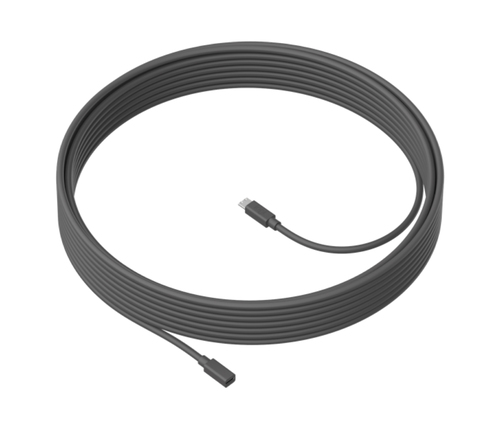
Audio is often the hidden bottleneck in meeting rooms. The camera can look great, yet if the table is long, the room is odd-shaped, or the display sits in the wrong spot, speakers end up too far from the mic. That’s where the Logitech MeetUp Mic Extension Cable earns its keep. With 10 meters, or 32.8 feet, of reach, it lets installers place the mic where people actually sit instead of forcing the room to adapt to the hardware.
That extra distance matters in larger conference tables, open collaboration zones, and rooms with awkward geometry. The practical benefit is simple: clearer pickup, fewer “you’re too quiet” complaints, and less improvising with adapters or moving chairs around. I’ve seen IT teams spend hours troubleshooting what turned out to be a placement problem, not a system failure. A cable fix can save all that time, which is why I usually see it as better value than replacing a working setup. It’s also a more sustainable move—extending the life of existing gear cuts waste and delays unnecessary upgrades. For a closer look at room-focused buying ideas, the collaboration gear category is a useful starting point.Why Protection and Warranty Coverage Matter More Than People Think
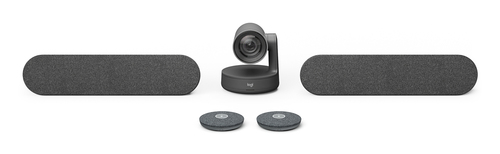
A good video conferencing room is still a business asset, and business assets need protection. Logitech Rally sits in the premium collaboration tier, so the extended warranty isn’t just a nice extra—it’s a risk-management choice. Enterprise buyers often skip support coverage during the initial purchase, then regret it later when the room becomes mission-critical. Adding an extra year to the original manufacturer warranty can improve budget predictability, lower downtime risk, and give IT teams more confidence in executive rooms, boardrooms, or busy hybrid spaces.
Support budgets feel boring until something breaks, right? Then they suddenly matter a lot. For rooms that anchor daily operations, service continuity can be the difference between a minor ticket and a meeting failure everyone remembers. That said, premium coverage isn’t necessary for every space. In a small huddle room, maybe not. But in a high-traffic environment with lean staffing, it’s often worth it. If you want to verify current support details and product positioning, Logitech’s official collaboration solutions page is the place I’d check first. I’d treat this as peace of mind, not fluff.When to Choose a Simple Hardware Fix vs a Premium Room Investment
The choice usually comes down to what’s actually broken. If the room already has a strong base system but the mic placement is poor, the Logitech MeetUp Mic Extension Cable is the smart, focused fix. It improves immediate usability, cleans up the install, and helps the acoustics without a full redesign.
On the other hand, if you’re supporting a high-end room that gets used every day, Logitech Rally extended warranty may be the better fit because it reduces future risk and protects uptime. I’ve seen both approaches work well in huddle rooms, training rooms, executive spaces, and customer-facing conference rooms. The important thing is matching the spend to the pain point. Premium doesn’t automatically mean better; sometimes the targeted accessory is the most cost-effective move. But if downtime would derail sales calls, board meetings, or leadership updates, service coverage starts to look like a smart insurance policy. Think about budget, room size, user expectations, and how painful a failure would be. That’s the real decision filter. For a broader category view, the meeting room upgrade options can help frame the trade-offs.What Most Teams Miss When Planning Video Conferencing Rooms
The rooms that work best usually aren’t the fanciest ones—they’re the ones planned for real life. Cable management, install flexibility, maintenance, support response time, and future reconfiguration all matter more than people expect. With hybrid work and flexible seating, rooms change more often now, so adaptability is a big deal. A 10-meter extension cable can make installation easier when tables move or when the mic needs to sit where voices are strongest.
And warranty thinking matters too, because a premium platform is only as good as its long-term support plan. A few lessons from the field: don’t run last-minute cables if you can avoid it, test mic placement before final mounting, and document support coverage before handoff. Common mistakes? Assuming the default mic location will work, forgetting the room will probably change later, and buying top-tier gear without a service plan. I’d add one more: not involving the people who actually use the room. Better collaboration usually comes from planning for change, not just buying hardware.Logitech MeetUp Mic Extension Cable vs Logitech Rally Extended Warranty: Which Helps More?
These two upgrades solve very different problems. The Logitech MeetUp Mic Extension Cable is about installation flexibility. Its 10-meter reach helps place microphones where people speak, which can improve voice pickup in larger or awkward rooms. The Logitech Rally extended warranty, meanwhile, is about protecting a premium investment and lowering downtime risk over time. Use the cable when you need better audio distribution or a cleaner install. Use the warranty when you’re supporting boardrooms, executive spaces, or high-use meeting rooms where service continuity matters. The cable gives fast, visible value; the warranty is more preventive and budget-friendly. If the biggest issue is poor mic reach today, the cable wins. If the bigger worry is long-term support confidence tomorrow, the warranty makes more sense.
How to Choose the Right Upgrade for Your Meeting Room
Start with the room itself: table size, seating layout, speaker positions, and whether people complain about audio pickup. Then decide whether the main issue is physical placement or long-term protection. If the mic is too far from participants, the Logitech MeetUp Mic Extension Cable may solve it quickly. If the room already performs well but needs support coverage, the Logitech Rally extended warranty is the better play. Next, map the purchase to business impact—executive rooms and customer-facing spaces usually justify more protection, while smaller huddle rooms may only need a targeted accessory.
Before you buy, verify compatibility, installation path, and cable routing. After setup, test again; even a small shift in placement can change the result. My pro tip: document the layout and support plan so future IT staff aren’t guessing six months from now. The best upgrade is the one that reduces friction without overspending, and that’s usually the one people barely notice after it’s installed.Conclusion
The biggest takeaway is pretty simple: better video conferencing doesn’t always come from replacing everything. Sometimes a cable that extends mic placement is the smartest fix. Other times, warranty coverage is what keeps a premium room dependable. One improves how the room works today; the other helps protect it tomorrow. Not every organization needs the most expensive option, and honestly, that’s fine. The most practical buyers usually focus on fit, risk, and user experience instead of chasing specs alone. Before you buy, think through your room layout, usage frequency, and support expectations. In my experience, when a room feels easy to use, people notice—even if they can’t explain why. If you’re ready to match the right upgrade to your setup and budget, explore the meeting room collaboration category and choose the fix that makes sense.
Frequently Asked Questions
Common questions about Video Conferencing